For millions of individuals, using a smartphone while traveling might be uncomfortable. It can occasionally cause headaches, nausea, dizziness, or general discomfort to read texts, browse social media, watch videos, or look at maps while driving. Motion sickness is a frequent term for this illness, which occurs when signals from the inner ear and eyes do not match.
With a new feature called Motion Sickness Assist, Google seems to be working on a solution for Android users. Previously known as Motion Cues and Motion Assist, the feature appears to be headed toward Android 17 integration, according to a recent examination of Google Play services.
The basic concept is straightforward yet intriguing: Android can provide tiny moving visual cues around the screen’s edges using motion data from the device. The purpose of these dots or bubbles is to provide the eyes with a visual reference that more precisely matches the movement that the phone detects.
Recent research suggests that Motion Sickness Assist is being developed as a system-level Android feature rather than just another third-party software, even though Google has not yet released a comprehensive public feature specification. Passengers may find it much simpler to use their phones while traveling as a result.
Android 17 Motion Sickness Assist: What Is It?
Google is working on a motion-sickness mitigation function for Android smartphones called Android 17 Motion Sickness Assist. It is mainly meant for those who find it uncomfortable to gaze at their phones while driving.
Initially, the feature was identified as Motion Cues. Later, Google seems to rename it Motion Assist, and in more recent Google Play services resources, it was renamed Motion Sickness Assist. Resources linking the feature with Android 17’s system services and the creation of a Quick Settings tile were discovered in an August 2026 study of Google Play services v26.31.
The feature’s ability to function while other apps are in use makes it very intriguing. A new DRAW_MOTION_CUES permission was linked to the feature in earlier development evidence, indicating that visual motion indications might be drawn across the screen instead of being restricted to a separate application.
Practically speaking, this means that while Motion Sickness Assist offers visual motion cues surrounding the display, a passenger might read an article, check a message, surf the web, or use another application.
Why Does Motion Sickness Occur When You Look at Your Phone?
Understanding the causes of motion sickness is helpful in comprehending Google’s strategy.
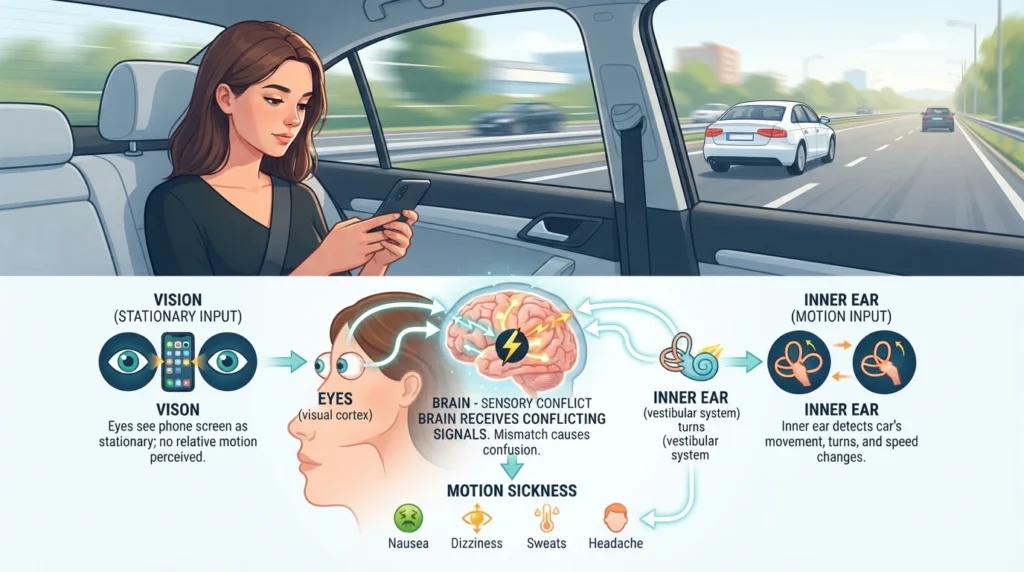
Your body interprets movement via a number of ways. While the vestibular system in your inner ear senses acceleration, rotation, and changes in movement, your eyes communicate what you can see to your brain.
Your eyes may see a somewhat stable screen when you are staring at a phone while seated in a moving vehicle. Your inner ear is simultaneously aware of your body’s motion, turning, acceleration, and halting.
A sensory conflict may result from this discrepancy between visual information and bodily activity. Some people may experience symptoms like these as a result of that conflict:
Feeling queasy
Lightheadedness
Sweating, headache, and exhaustion
Having trouble focusing
Overall discomfort
Because the user’s visual attention is focused on a small, seemingly stationary display when reading or watching something on a phone, the issue may become more obvious.
Google’s suggested fix makes no effort to halt the car’s motion. Rather, it makes an effort to give the eyes more visual details about that movement.
How Does Motion Sickness Help Operate?
The feature’s usage of the phone’s motion sensors is its most intriguing aspect.
Sensors that can identify movement and orientation changes are already present in smartphones. It looks like Google’s upcoming feature uses this data to manage visual cues that are shown around the screen’s edges.
Development resources have referred to these indicators as dots or bubbles. They are designed to react to the vehicle’s movements.
For instance, the visual indications may move in the same direction when a car turns. The vehicle’s movement may alter if it accelerates or changes course.
Making the entire screen move is not the aim. Rather, the approach lets the user continue to focus on the content in the center of the display while offering minor periphery visual references.
This method is theoretically comparable to Apple’s Vehicle Motion Cues, which lessens the sensory conflict that comes with using a device in a moving car by placing animated dots around the edges of an iPhone or iPad display. A similar concept seems to be being pursued by Google’s Android implementation.
What Is the Difference Between Motion Cues, Motion Assist, and Motion Sickness Assist?
When looking up the functionality, users may come across multiple titles, which can complicate Google’s development history.
Motion Cues were initially identified as the feature. While more current Google Play services research revealed Motion Sickness Assist, later development references used the moniker Motion Assist.
Rather than referring to three distinct Android functions, these names seem to allude to the same underlying Google feature.
Because Motion Cues and Motion Assist were used in earlier publications and development reports, individuals might still search for all three names for SEO purposes. Thus, while talking about Google’s technologies, Android 17 Motion Sickness Assist, Motion Assist, and Motion Cues are all pertinent search terms.
Integration with Android 17
Analysis of Google Play services provides one of the most compelling current signals regarding the feature’s future.
Resources linked to direct integration between Motion Sickness Assist and Android 17 (API level 37) were found in a mid-August 2026 review of Google Play services v26.31. A Quick Settings Tile implementation for the functionality was also discovered by the same study.
This is significant because it implies that deeper operating-system integration is being planned for the functionality.
Additionally, the Quick Settings implementation may make it easier to activate the option. Users may be able to activate or deactivate Motion Sickness Assist straight from Android’s Quick Settings panel rather than having to navigate through multiple menus each time they get into a car.
Nevertheless, some features should still be regarded as development information rather than final specs because these conclusions are based on app research rather than an official Google product release.
How Could Motion Sickness Help Be Activated?
Before Google’s public deployment, the precise final settings interface might change.
However, the functionality is anticipated to include a dedicated settings experience and a Quick Settings integration based on the development resources found thus far.
A standard implementation might enable users to:
Go to Android Settings.
Locate the option for Motion Sickness Assist.
Activate the feature.
Personalize the visual cues that are accessible.
Add the feature to Quick Settings if you’d like.
Turn it on while you’re a passenger.
According to earlier claims, Google was also creating alternatives for the motion indicators’ look, such as visual modification.
Depending on the Android 17 release and device manufacturer, the final menu titles and precise controls might change.
Is It Compatible With Other Android Apps?
This could be one of the feature’s most beneficial features.
Motion Sickness Assist is designed to show visual motion cues when users are engaged with other applications, according to development evidence for the DRAW_MOTION_CUES permission.
This implies that the functionality might be helpful for routine tasks like:
Examining websites
Examining emails
Responding to messages
Examining Google Maps
Perusing electronic books
Observing videos
Looking through social media
Working with documents
The device might offer the visual indications on top of the information the user is now seeing rather than launching a separate motion-sickness application.
Regular travelers may find the feature more useful thanks to the system-level approach.
Android 17 Motion Sickness Assist: Who Could Use It?
Passengers who get motion sickness when using a smartphone in a moving car are the main target audience for this function.
Those who frequently travel by might find it very helpful.
Car, bus, train, taxi, and ridesharing vehicles
Visual motion cues offer an extra signal of the vehicle’s movement, which may be helpful for people who often avoid reading or using their phones while traveling.
Motion Sickness Assist is not a surefire remedy for motion sickness, though. People react to motion in different ways, so a visual signal that works for one person might not work as well for another.
What Are the Principal Advantages?
- More Comfortable Use of Phones
The ability to use a smartphone more comfortably while traveling is the largest potential benefit.
- Integration at the System Level
It might be more practical than depending on a different third-party application because the capability is linked to Android system services.
- Easy Access to Settings
There is support for a Quick Settings tile, which could speed up activation, according to recent development evidence.
- Coexists with Other Applications
Users may be able to continue using their favorite apps while motion cues are still displayed thanks to the overlay-style implementation.
- No Particular Hardware
The feature relies on motion detection and visual input from smartphones. Customers wouldn’t have to affix a tangible device on their phones.
Apple’s Vehicle Motion Cues versus Android’s Motion Sickness Assist
The strategy used by Google is not entirely novel. Vehicle Motion Cues, an accessibility feature for iPhone and iPad users, was launched by Apple.
The general idea behind both methods is the same: display moving visual indicators close to the display’s edges so that visual data more accurately depicts the movement that the device detects.
For Android users who have desired a similar experience, Google’s addition is particularly intriguing.
Google’s solution is being developed as part of the Android/Google Play services ecosystem, which is the main distinction for Android. Recent research points to stronger system integration for Android 17, including support for Quick Settings and a dedicated motion-cue service.
Android devices and manufacturers may still have different final user experiences.
Will All Android Phones Have Motion Sickness Assistance?
Users should use caution in this particular location.
The availability of Android 17 integration does not guaranty that all Android smartphones will get the same feature at the same time.
System software can be customized by Android manufacturers, and availability may vary depending on the Android version, Google Play services version, device hardware, location, and OEM implementation.
Google’s ultimate distribution plan and compatible device list should be examined until the firm releases official documentation, but recent development data suggests that Android 17 is a key target for the functionality.
As a result, consumers shouldn’t believe that obtaining an Android update will ensure that every device has Motion Sickness Assist right away.
Does Motion Sickness Help with Medical Treatment?
No.
It is best to think of the feature as a piece of technology that may make using a smartphone while moving more pleasant. It should not be used as a substitute for expert medical advice and is not a medical therapy for motion sickness.
A person should speak with a qualified healthcare provider if they suffer from severe, frequent, or persistent motion sickness.
Basic techniques like glancing outside the car, selecting a seat facing forward, getting some fresh air, and taking breaks from electronics may also be helpful for regular travel.
Why Is Google’s Strategy Interesting?
The idea is straightforward, but since Android handsets are used by a wide variety of individuals and gadgets, Google’s implementation may be beneficial.
Motion cues may be included into the standard Android experience rather than requiring users to download an extra app.
Additionally, the development history demonstrates how much work Google has invested in perfecting the function. Initially known as Motion Cues, it subsequently changed its name to Motion Assist and is currently referred to internally as Motion Sickness Assist.
It appears that the project has advanced beyond a basic experimental interface with the discovery of Android 17 system-service integration.
What Can Android Users Anticipate?
Until Google formally defines the whole capability, Android users can anticipate some ambiguity.
Although development features may change before to public release, the information currently available strongly implies that Google is developing Motion Sickness Assist for Android 17.
The final version may differ in terms of supported devices, activation methods, names, settings, and graphic designs.
In order to lessen the sensory mismatch that comes with using a phone while traveling, it is now safe to assume that Google is developing an integrated Android solution that makes use of motion sensors and animated visual clues.
FAQ
What is Motion Sickness Assist on Android 17?
Google is working on a feature called Android 17 Motion Sickness Assist that will enable customers who use their smartphones while traveling experience less motion sickness. It makes use of visual signals and motion data that are shown all over the screen.
Was it formerly known as Motion Cues?
Indeed. Prior to the more recent Motion Sickness Assist term appearing in Google Play services resources, development references utilized the names Motion Cues and Motion Assist.
In what ways can Motion Sickness Assist lessen motion sickness?
It aims to lessen the discrepancy between what your inner ear detects from the movement of the car and what your eyes perceive on the phone. An extra visual cue that corresponds to motion is provided by moving dots or bubbles.
Does Android 17 Motion Sickness Assist need a separate app?
Instead than requiring a stand-alone third-party app, the new approach seems to be intended for deeper Android and Google Play services integration. Additionally, recent research shows system-service integration for Android 17.
Can I use it to watch videos or read?
Based on the found overlay-related permission, the feature is being developed to show motion cues while other programs are running.
Is it compatible with all Android smartphones?
Not always. Android version, hardware, Google Play services, manufacturer software, and regional rollout can all affect final availability.
Is there a treatment for motion sickness using Motion Sickness Assist?
No. It’s a technological function that might make using a device while traveling less uncomfortable. It is not a medical remedy.
Are phone sensors used by Motion Sickness Assist?
Motion data from the device is the foundation of the feature’s construction. Visual cues on the display can be moved with the help of this information.
When will Motion Sickness Assist for Android 17 be released?
Android 17 integration is suggested by recent August 2026 study; nevertheless, Google’s official release information should be used to confirm the final public rollout and precise availability.
In conclusion
For regular travelers, Google’s Android 17 Motion Sickness Assist may be one of those minor Android additions that have a surprisingly significant impact.
The idea is simple: when your car moves, your phone can recognize it and use visual cues around the screen to help your eyes understand what your body is feeling. Google aims to improve passenger comfort with smartphone use by minimizing the visual mismatch between a stationary-looking screen and a moving vehicle.
Before reappearing more recently as Motion Sickness Assist, the feature went through a number of development names, including Motion Cues and Motion Assist. Because it connects the feature to Android 17 system services and a Quick Settings tile, the most recent Google Play services study is very important.
However, consumers should keep in mind that Google’s final rollout decisions still apply to the functionality. Before the final release, device support, settings, availability, and graphic design may change.
Android 17 may provide travelers with an easy-to-use built-in method to continue reading, browsing, or using their phones while traveling without feeling the same degree of motion-related discomfort if Google delivers the feature as currently indicated.