Google Pixel phones are renowned for providing a smooth Android experience, practical gestures, and software features that frequently first appear on Pixel devices before spreading to other Android phones. Double-tapping the screen to lock the phone and switch it off is a straightforward motion that has been shockingly absent from the Pixel experience for years.
At last, that might be changing.
Google has reportedly been developing a double-tap-to-lock gesture for Pixel phones, according to reports and Android testing. The concept is simple: users can turn off the display by double-tapping a suitable area of the screen rather than pushing the traditional power button. Because Pixel users have consistently asked for this feature throughout the years, it has garnered attention.
Testing and reports should be kept apart from verified availability. Double-tap-to-lock is not listed as a regular headline feature in Google’s public Android 17 feature announcement, despite the formal release of Android 17 and multiple Pixel updates in 2026.
What precisely is Google testing, how might it operate, and why is such a little feature so important? This is all the information that Pixel users need to know.
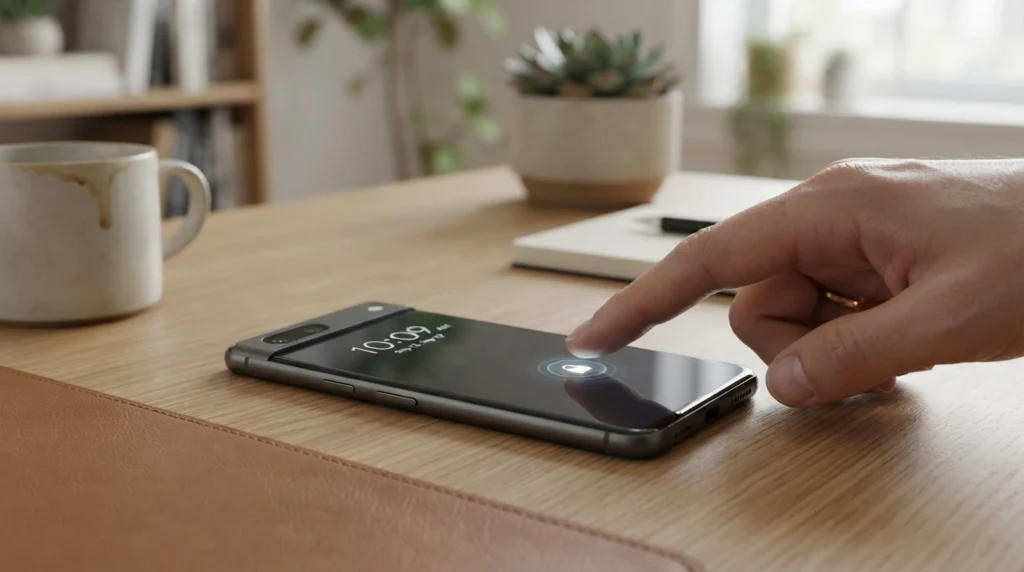
An explanation of Google’s Double-Tap-to-Lock feature
Double-tap-to-lock has a very straightforward principle. The phone would turn off the display and lock itself if the user tapped the screen twice in quick succession.
Google’s current double-tap-to-check-phone feature, which lets users interact with or wake the display, is not the same as this. While double-tapping to lock has traditionally required a workaround, double-tapping to check or wake the phone has long been mentioned in Pixel support material and Google community conversations.
Users have been requesting both sides of the experience—double-tap to wake and double-tap to sleep—so this difference is crucial.
The capability seems almost obvious to many Android users. For instance, it may seem unnecessary to touch a physical button when the phone is resting on a desk because the entire display is already accessible.
Thus, screen locking could become considerably more convenient without the need for extra hardware or a third-party launcher thanks to the alleged Pixel implementation.
Why Double-Tap-to-Lock Has Been Desired by Pixel Users
Numerous gesture-based controls are currently available on Pixel phones. Quick Tap, which enables compatible Pixel phones to conduct things simply touching the rear of the device twice, is explained in Google’s own support material. Quick Tap can be used for tasks including taking a screenshot, displaying notifications, launching an application, or managing media, depending on the phone and software version.
The native Pixel experience has lacked screen locking by a straightforward double tap, despite this emphasis on gestures.
There are numerous conversations on Google’s Pixel Community where users have expressly asked about double-tap-to-lock. For instance, a 2024 discussion questioned whether a double tap may lock a Pixel 7 Pro. Users seeking solutions to lessen their need on the physical power button may also be seen in older conversations.
There are various reasons why the demand makes sense.
Simpler One-Handed Function
The size of modern cellphones has increased, making it uncomfortable to use one hand to reach the power button.
Users could lock the device from the display itself by using a double-tap gesture. When using a phone with one hand, that may be extremely helpful.
Reduced Reliance on the Power Button
Although physical buttons are practical, some users would like not press them as frequently. Another alternative is a lock gesture that is software-based.
It might lessen the frequency with which users must click the power button just to turn off the display, but it wouldn’t completely replace it because the button would still serve a number of other purposes.
A More Reliable Gesture-Based Experience
Many gestures are already included in Pixel program. From Quick Tap to other motion and touch capabilities, Google has been working harder to make Android interactions more user-friendly.
The whole experience would feel more finished if there was a native double-tap-to-lock gesture.
How Would Double-Tap-to-Lock Operate?
Although the claimed notion is somewhat simple, the precise execution may depend on Google’s final software design.
Two fast taps on a certain part of the screen or an appropriate section of the interface would probably be recognized by the gesture. The display would shut off and the device would go into locked mode as soon as the second tap was detected.
Previous Android 16 testing revealed that a double-tap gesture may be used on an empty section of the lock screen to turn off the display. This is an intriguing element of the reported testing. According to reports from the Android testing community, Google tested this behavior prior to the feature’s widespread release.
This indicates that rather than just reacting to user requests, Google seems to have given the feature careful thought.
Testing does not, however, guaranty that the feature will be available to all Pixel users. Prior to a public release, Google may alter, postpone, or eliminate experimental functionality.
Double-Tap-to-Lock vs the Power Button
| Feature | Double-Tap-to-Lock | Power Button |
|---|
| Locks the phone | Yes | Yes |
| Requires physical button | No | Yes |
| Useful for one-handed use | Potentially | Depends on grip |
| Works without touching screen controls | No | Yes |
| Familiar physical control | No | Yes |
| Could reduce button usage | Yes | No |
| Software dependent | Yes | No |
Even if Google implements the gesture, the power button will still be crucial. It does not rely on touch input and provides a dependable physical way to wake and lock the phone.
Double-tap-to-lock would merely provide consumers with an alternative method of carrying out the same fundamental function, rather than taking the place of the power button.
How Do Third-Party Apps Fare?
Owners of pixels haven’t always been without choices.
For customers who desired alternatives to pushing the actual power button, Google Pixel Community conversations have already suggested options like third-party launchers or accessibility features.
Additionally, there are third-party Android apps that offer double-tap screen-off or lock features.
For many users, tho, a native Google implementation would be better.
Installing a different launcher or application, setting up extra permissions, or relying on an outside developer to ensure compatibility with upcoming Android versions are not necessary for built-in features.
Because the operating system would handle the gesture directly, native integration might also result in a more seamless experience.
Why It Would Be Better to Have a Native Google Feature
Although they frequently entail tradeoffs, third-party solutions can be helpful.
The home-screen experience might be altered by a launcher-based strategy. Additional system rights or restrictions can be necessary for an accessibility-based solution. After Android updates, apps may potentially cease functioning properly.
Much of that complexity would be avoided with a native Pixel gesture.
Google could make the function’s behavior comparable with other system motions and incorporate it straight into the Pixel settings.
Additionally, this could help avoid unintentional screen locks by allowing users to control when the gesture is active.
Possible Issues With Double-Tap-to-Lock
Despite the feature’s seeming simplicity, Google still has to address a few usability problems.
Unintentional Touches
Accidental activation is the largest problem.
Normal interactions may occasionally cause the phone to lock if the user double touches anywhere on the display.
As a result, Google must decide on the best time and location for activation.
Conflicts in Gestures
Many touch gestures are already used on Android phones. If a new double-tap action is applied too widely, it may disrupt current interactions.
This issue might be avoided with a well-defined gesture region.
Discoverability
Assisting users in discovering the feature presents another difficulty.
Many Android settings have a lot of power but are buried deep. If Google decides to implement double-tap-to-lock, it must make the feature simple to comprehend and set up.
Availability
The main problem at the moment is that consumers shouldn’t assume that every Pixel phone has the capability.
Google’s official 2026 Numerous more features, including as improved multitasking, screen responsiveness, security, and new AI tools, have been added by Pixel upgrades. In those formal announcements, double-tap-to-lock has not been promoted as a standard feature.
Benefits and Drawbacks of Double-Tap-to-Lock
- Screen locking that is more practical
It may be possible for users to switch off the display without using the power button. - Improved usability with one hand
On larger Pixel versions, the feature might be very helpful. - Less use of tactile buttons
The power button may be less necessary for users who use software gestures. - Integration with native Android
Compared to many third-party options, a Google-built solution ought to be more reliable. - Easy learning curve
The majority of smartphone users are already familiar with the simple gesture of double tapping. - Beneficial when using a desk phone
By just pressing the side button, users may lock their phones without picking them up.
Drawbacks
- There is a chance of accidental activation
Unwanted screen locks could result from poorly designed gesture recognition. - Not every Pixel might receive it.
Google may restrict the capability to specific Android devices or versions. - Release is not guarantyd by testing
Before a stable launch, experimental Android features may alter or vanish. - The power button is still required.
Instead of totally replacing the physical button, double-tap-to-lock would enhance it. - Conflicts between gestures could happen
Google must make sure that the functionality doesn’t get in the way of regular touch interactions.
Which Pixel phones could be able to use this feature?
A full list of compatible Pixel models would be premature at this time.
Google’s current Pixel software strategy is more closely linked to Pixel-only features, hardware generation, and Android version. In June 2026, Android 17 started to roll out to Pixel devices; Google said that compatible non-Pixel Android devices would follow.
Compatibility may depend on the final software implementation if double-tap-to-lock is ever made an official Pixel feature.
Google may first restrict it to newer models, or it may be made available to all compatible Pixel smartphones.
Therefore, rather than presuming compatibility based solely on the phone’s model number, Pixel owners should review their device’s gesture and lock-screen settings following future system or Pixel Feature Drop upgrades.
Is Double-Tap-to-Wake Currently Available?
Indeed, double-tap-related wake/check feature is available on Pixel phones.
The ability to enable Double-tap to check the phone thru the lock-screen settings is mentioned in Google Pixel support talks.
This further highlights the lack of a corresponding double-tap-to-lock feature.
Practically speaking, balanced experiences would be ideal:
Tap twice to wake the screen.
and
Tap twice to turn off the screen.
Many Pixel users have asked for the latter feature just for that kind of consistency.
Is This Going to Be Included in a Future Pixel Feature Drop?
Although there isn’t a confirmed release date that people can depend on, it is possible.
Alongside Android releases, Google regularly introduces new features thru Pixel Drops. For example, the June 2026 Pixel Drop included floating app bubbles, screen reactions, and creative features driven by Gemini.
Since double-tap-to-lock is a quality-of-life enhancement rather than a significant hardware-dependent function, it would readily fit into this model.
Nevertheless, Google has not made a public commitment to a certain double-tap-to-lock release date.
What Pixel Users Need to Do Immediately
There is no reason to believe that there is a problem with your Pixel if it does not currently display a built-in double-tap-to-lock feature.
While community conversations have traditionally directed users toward accessibility features or third-party solutions for double-tap-to-lock, Google’s official Pixel documentation now provides screen-lock alternatives including automatic locking and power-button locking.
Third-party solutions can offer a substitute for those that need the feature right away. Before installing any application, users should thoroughly examine the rights it requests.
The best course of action for everyone else is to simply keep the Pixel updated and keep an eye on the gesture settings following upcoming updates to both Android and Pixel.
Pixel Software’s Bigger Picture
Double-tap-to-lock may appear to be a relatively minor function at first.
However, minor enhancements to quality of life can make a big difference in how comfortable a phone feels on a daily basis.
Google has been concentrating more on improving the context, personalization, and utility of Pixel devices. AI-powered features, safety tools, increased productivity, and simpler interactions have all been highlighted in recent Pixel releases.
A straightforward screen-lock motion is consistent with that larger idea.
Redesigned hardware, a speedier processor, or a new camera are not necessary. Rather, it makes using an existing phone a little bit simpler.
And that is precisely the kind of characteristic that might be incorporated into a person’s everyday activities.
Final Decision
Given that Pixel owners have been requesting this feature for years, Google’s stated work on a double-tap-to-lock function for Pixel phones is a positive move.
The feature is not groundbreaking in and of itself. Similar functionality has been made possible for users via specialized apps, accessibility tools, and third-party launchers. The potential to integrate the feature directly into the Pixel OS experience is what would make Google’s implementation crucial.
However, reports of double-tap-to-lock should currently be viewed by users as testing or development information rather than a Pixel feature that is accessible to all users. Although numerous new features are highlighted in Google’s official Android 17 and June 2026 Pixel announcements, double-tap-to-lock is not yet a standard feature on all Pixel phones.
If Google eventually implements the functionality correctly, it might end up being one of those minor upgrades that people soon forget about and later question how they managed without.
FAQ
- Is double-tap-to-lock presently available on Google Pixels?
A common native double-tap-to-lock gesture has never been available on Pixel phones. Discussions in the Google community have frequently addressed demands for this feature and offered substitutes.
- Will double-tap-to-lock be added by Google?
According to sources, Google has tested the functionality on Android. Users should differentiate those stories from a formal, widespread launch, tho. Double-tap-to-lock is not listed as one of the key features in Google’s official Android 17 feature announcement.
- Is it possible to lock my Pixel without using the power button?
Indeed. Alternatives like third-party apps or accessibility controls are available to users, depending on the Android version and configuration. A number of screen-lock settings are also available in the Google support manual.
- Is double-tap-to-wake supported by Pixel?
Depending on the hardware and software setup, Pixel phones can be checked or woken with a double touch.
- Will the double-tap-to-lock feature be included to every Pixel phone?
As of right now, there isn’t a verified list of universal compatibility. The Android version that each Pixel device supports and Google’s final implementation will determine support.
- Do third-party apps offer double-tap-to-lock?
Indeed. For Android phones, including Pixel models, a number of third-party apps and launchers have provided screen-off or lock gestures.
- Will double-tap-to-lock be included automatically in Android 17?
Google’s public Android 17 feature announcement says otherwise. Double-tap-to-lock is not included as a standard feature in Android 17, despite the fact that it has many new productivity, privacy, and security enhancements.
- What is the purpose of double-tap-to-lock?
Convenience is the primary benefit. It is particularly useful for one-handed use or while the phone is laying on a table because it allows users to lock the phone from the display instead of reaching for the hardware power button.